For property managers
Run the money reports for income, cash flow, expenses, debt and the balance sheet
The Reports page has seven money reports beside the rent roll and arrears. Each one opens with a sensible period, shows a Summary of its headline figures above the table, and has a Download PDF and a Download CSV button. The filters work as on every report: choose them, select Apply filters, and the page address keeps them.
Income statement
Income by kind (rent, other charges to tenants, other income such as returned-payment fees) and expenses by tax line, per property, with the prior period beside each figure. The summary gives income, operating expenses, NOI (actual, period), which is the net operating income you actually earned in the period before mortgage interest, then mortgage interest and net income before CCA.
It is prepared like your T776: rent is what was charged for the period, expenses are what was incurred, and capital costs are left out. For a calendar year it equals your T776 to the cent. It opens on Year to date. Choose a month, a quarter, This year, Last year or your own dates. A whole month, quarter or year is compared with the one before. A period still running is compared like for like: year to date in October is compared with January to the same day of October last year, and a quarter so far with the same number of days into the quarter before. A custom range is compared with the same number of days just before it.
Cash flow
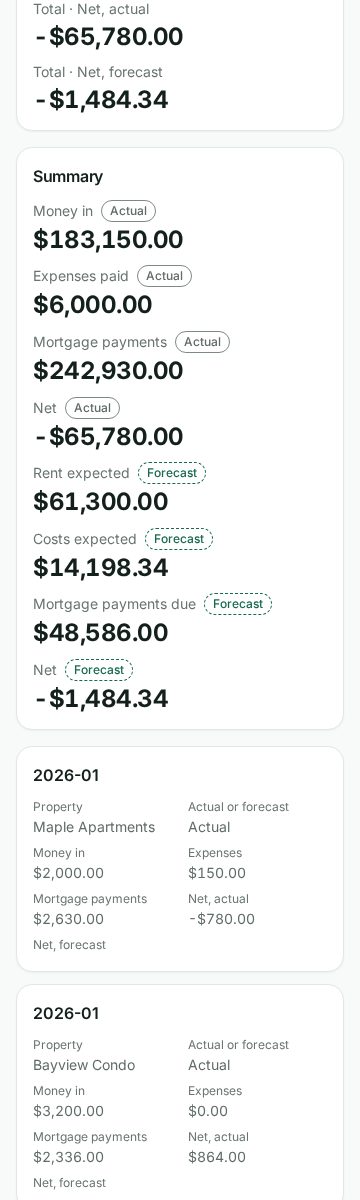
Money in and out by month, per property. Months behind you are Actual: payments received, expenses recorded and your loans' scheduled payments. Months ahead are Forecast: today's rent, the recurring costs on each property's Financials tab, and the same mortgage payment the Financials tab uses. Every row and every summary figure says which it is, and the PDF says it too. The actual net and the forecast net are kept in separate columns, so a total never adds a forecast to money that has moved. It opens on This year.
If a loan's payments cannot be worked out for a month, for example because its term ended and no renewal is recorded, the report says so in a note on the screen and in the PDF rather than counting them as zero. Months before a loan starts are a real zero.
Add a property's insurance, property tax or condo fees on its Financials tab (or say "insurance per month is 120") and the forecast uses them.
Expenses by category
Every expense in the period, grouped by category with a subtotal, its vendor, whether a receipt is on file, and whether it is a capital cost or a current expense. Filter by category, vendor, property and amount. An expense waiting for approval, or archived, is not counted.
Income by type
What was billed by kind (rent, each kind of other charge such as parking or cleaning, returned-payment fees, card surcharges and deposits kept) beside what was collected. Collected money is split into rent and everything else, in the order your payments apply to charges. The summary also shows the deposit interest you owe your tenants. That is money you owe, not income.
Investor performance
For each property and for the portfolio: value, mortgage balance, equity, NOI (run rate), cap rate, cash-on-cash, DSCR, total gain and the return a year. The figures are the same ones the Financials tab and your net worth show. NOI (run rate) is a year of today's rent less today's operating costs, the same figure as NOI (yearly) on the Financials tab, so it is not the NOI the income statement shows for a past period. Choose an As of date for the mortgage balance and the total return. A ratio that needs a purchase price or a rent stays blank rather than showing a made-up zero.
Debt schedule
Every mortgage on file with its balance as of the date, rate, payment and renewal date, the soonest renewal first. Filter by Renewing within 120 days to see what to plan for.
Balance sheet
What the properties own and owe on one day. Assets are each property's value, the cash and the rent owed to you. Liabilities are each mortgage, your tenants' security deposits and the interest you owe on them. Equity is assets less liabilities. Each line says where it comes from: the value is the latest valuation on file and the mortgage is the loan's own schedule, the same figures as the Net Worth page. Cash and rent receivable come from the general ledger, the same as the trial balance on that day. The deposits and their interest are the deposit register's.
It is a management view built from your records, not an accountant's statement, so equity is an estimate. Cash is what Wealthru recorded as received less what it recorded as paid out. Mortgage payments are only in it if you entered them as expenses, so it can read higher than your bank. When a property has no valuation, or no mortgage on file, the line reads Not available rather than $0, and the note under the table says which property. Choose an As of date to see the balance sheet on another day. The mortgage balances, ledger balances and deposits are read on that day, but the properties, valuations and loans are the ones on file today, so a property sold since is left out and a loan that began after that day shows its full amount. The note names any such loan.
Ask for it by name
With Talk to Wealthru turned on, say "profit and loss for last year", "cash flow for Maple Apartments", "expense report over $250", "upcoming mortgage renewals" or "balance sheet". Wealthru opens the report with what you said applied.
A property manager who looks after some of the properties sees only those properties in every report.
The income statement comes with the plans that include the T776. The cash flow and investor performance come with the plans that include analytics and net worth. The balance sheet comes with the plans that include net worth, and needs the General ledger turned on for your account (it is on unless it was switched off). The other three are on every plan.
En français
Ouvrez Rapports et choisissez État des résultats, Flux de trésorerie, Dépenses par catégorie, Revenus par type, Rendement des immeubles, Calendrier des dettes ou Bilan. Vous pouvez aussi dire « profits et pertes de l'année dernière », « flux de trésorerie » ou « bilan ».
Le Bilan montre ce que les immeubles possèdent et doivent à une date : la valeur de chaque immeuble, l'encaisse et les loyers à recevoir à l'actif, les hypothèques, les dépôts de garantie et les intérêts dus au passif, et l'avoir, qui est une estimation. Un immeuble sans évaluation ou sans hypothèque au dossier affiche Non disponible, jamais 0 $. À une autre date, les immeubles, les évaluations et les prêts sont ceux au dossier aujourd'hui.
Was this helpful?