For property managers
Payments, deposits, vacancy, maintenance and owner reports
The Reports page lists a report for each everyday question about your rentals. Each one has filters, shows its totals, and has a Download PDF and a Download CSV button. The PDF says which filters you chose, in words, so a printed page always says what it covers.
The reports
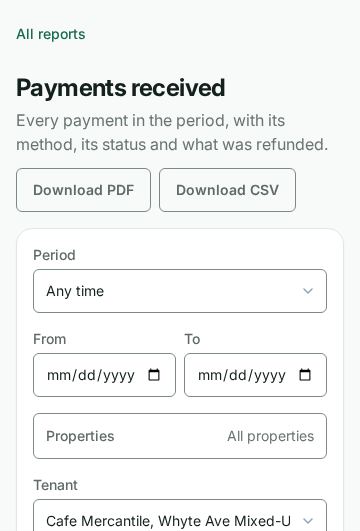
- Payments received: every payment in a period, with its method, its status, what was refunded and the net received. Filter by period, property, tenant, method, status and amount. It lists the same payments as the Payments page, and covers the last 12 months unless you choose a period.
- Arrears aging: every tenancy owing, split into not yet late, 1 to 30, 31 to 60, 61 to 90 and over 90 days.
- Collections rate: for each month, the rent billed, what was collected against it, and how much came in by the due date plus the lease's grace days, on Toronto time. Late fees, NSF fees and other one-off charges are not counted as rent billed. A payment always clears the oldest charge first, so a tenant who still owes an older month never shows as on time, even when they pay the current rent promptly. It covers the last 12 months unless you choose a period.
- Deposit register: every deposit, the interest owed on it as Wealthru has accrued it for your province and the kind of deposit, and, once a tenant has moved out, the date it must be returned by.
- Vacancy and turnover: every unit, whether it is vacant and for how many days, the move-ins and move-outs in the period, and how long its tenancies lasted. A renewal is not counted as a move-in.
- Lease expiry and renewals: every term that ends in the period, soonest first, with its rent. With no period it shows the next 90 days, like the renewals list on the Reports page.
- Rent change history: every rent increase you scheduled and every rent changed at a renewal, with the date and the percentage.
- Maintenance: every request, how long it has been open or took to close, its priority, trade and vendor, and its cost from the expenses linked to its work order.
- Vendor spend: what each vendor was paid in the period, from the expenses linked to them.
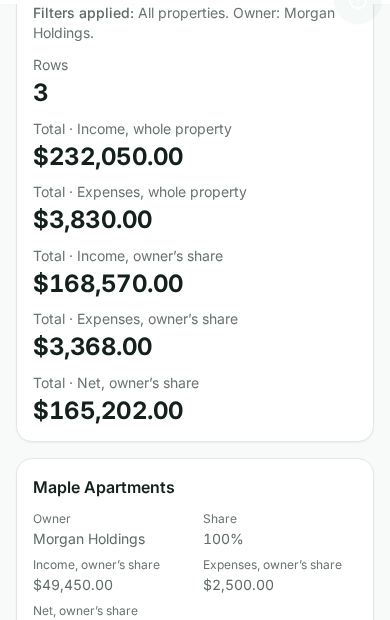
- Owner statements: each owner's properties, with income, expenses and net for the whole property and at that owner's share. Choose one owner in the Owner filter and download the PDF to send them their statement. It shows the same figures the owner sees in their own portal.
Good to know
- A property manager who looks after some of the properties sees only those properties, their tenants, owners and vendors in every report.
- A report about a page that is switched off for your account (the Payments page, arrears plans, or vendors) is switched off too.
- The deadlines in the deposit register follow your province's rules. A deadline marked "preview" has not been checked by a person yet. This is tooling, not legal advice.
Ask for it by name
With Talk to Wealthru turned on, say or type the report you want, with a period or an amount if you like: "payments received last month", "aging report over $500", "owner statements for last year", "collections rate for 2025".
En français
Ouvrez Rapports et choisissez un rapport. Vous pouvez aussi dire « paiements reçus le mois dernier », « registre des dépôts », « rapport d'entretien » ou « relevés des propriétaires ».
Was this helpful?