For property managers
Talk to Wealthru
Say or type what you want to do, like log rent or the sink is leaking at 42 Elm, and Wealthru walks you through it in a few taps. Every answer is a choice you can tap. Anything you already said is filled in for you, and nothing is recorded until you check it and say yes.
Before you start
- Talk to Wealthru is on for every account, on every plan. It is a setting called "conversational actions". It offers only the tasks your role and plan already let you do on the page, so it never offers something you cannot finish. Everything it does can still be done on the page.
- It understands English and French, including how people really talk: rentrer le loyer, le rent est rentré, booker le plombier, canceller les frais de retard, la job est faite, with or without accents.
- Account owners and property managers can use it. A manager assigned to some properties only sees those properties in it, as on every page.
Start a conversation
- On a computer, press Cmd K on a Mac or Ctrl K on Windows or Linux. On a phone, tap Say or type at the top of the screen.
- Type what you want, or tap the mic on your phone's keyboard and say it. For example log rent, log rent 42 Elm October 1850 cash, paid the plumber 240, make it urgent or who owes me.
- When Wealthru recognises a task it offers it first, for example Log a rent payment. Choose it. Search still works as before for everything else.
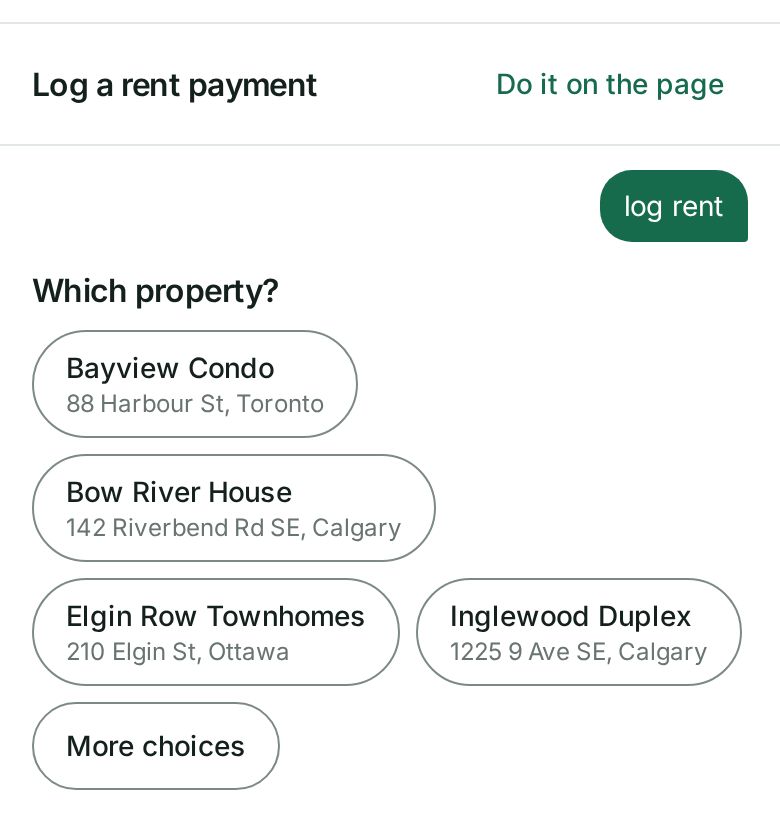
- Answer each question by tapping a choice. Anything you already said is marked From what you said. Tap it to change it.
- Check the card. It says exactly what will be recorded or sent, for example the tenant, the month, the amount, the method and the date, and anything else that happens with it.
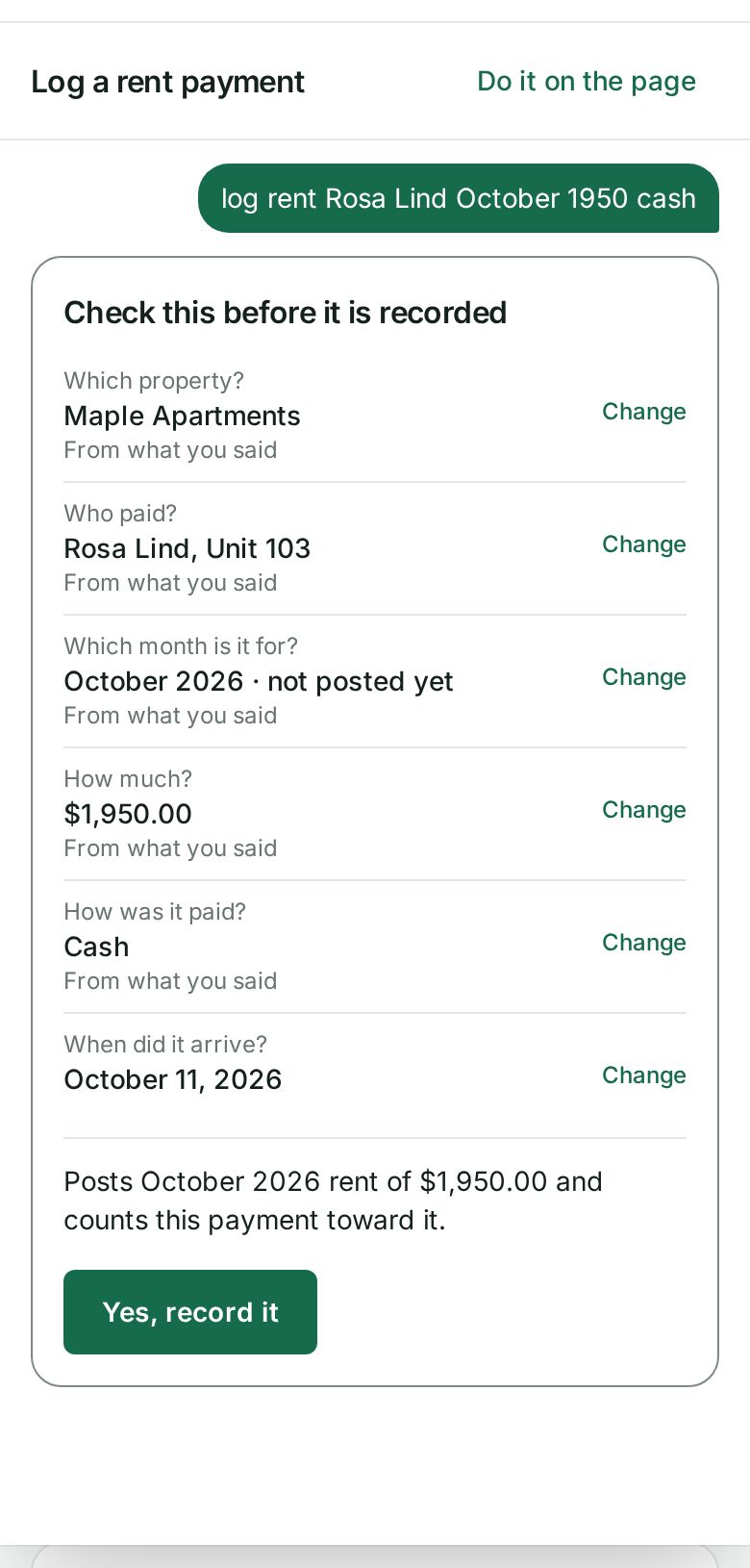
- Choose Yes, record it (or Yes, send it for a message). You see the same result the page would give you, or Sent for approval when your account needs an approver to sign it off.
Open search with nothing typed and it shows Try saying examples for the page you are on.
Do it on the page
Do it on the page is there at every step. It opens the page that does the same task, with everything you answered so far already filled in where that page can take it. Use it whenever you would rather see the whole form, or when a question needs something the conversation does not ask.
If the page refuses something, Wealthru shows you the page's own reason, word for word, and offers the page with your answers kept. A conversation never gets around a rule the page has.
What you can say
- Rent and money in: log rent, a cheque that bounced, move a payment to another month, void a charge, write off a balance or recover it, set up a payment plan, send a rent reminder or a statement, refund a tenant.
- Money out: record an expense, scan a receipt, resubmit a rejected expense.
- Approvals: what needs approving, then approve or reject each item.
- Maintenance: a new request, a status change, a visit, a priority, a vendor, a finished job, a reopened request.
- Messages: message a tenant, add an internal note, send a notice to everyone at a property, and email all your tenants at once (Portfolio plan, only the tenants who agreed to receive email).
- Renewals: offer a renewal, and record the answer a tenant gave you by phone or on paper, like Jordan accepted the renewal.
- Questions: who owes me, what is due, which leases end soon, what a tenant owes, open maintenance. The answer comes with an offer to do the next thing, like logging a payment.
- People: new tenant Sam Park sam@example.com, invite Sam to the portal, send an application for unit 2, and approve the application from Sam or decline an application.
- Your properties: add a unit, add a key date (an insurance renewal, an inspection), record an insurance policy, Maple Court is worth 1200000, and publish the listing or take down the listing.
- Records: share the house rules with Sam, invite my property manager, and archive a tenant.
- Books: capitalise an expense, I sold the old furnace, and close the books.
- Moving out: start the move-out inspection, adding each area as you go, and settle a deposit, adding each deduction as you go. You can change or remove any one of them before you confirm.
- Take me there: new lease, add a property and open the tax package answer which unit, tenant or year first and then open the page with it chosen. Nothing is saved until you finish there.
Each help article for these tasks has a line on saying it.
Good to know:
- In a money task every classification is asked, never guessed from a word: the CCA class and where a value comes from.
- Closing the books takes the month you say, or asks for it, and names the exact day they close through. Only months after your current close are offered. Re-opening the books stays on the page.
- A property valued by units is not offered for a valuation. Record its unit values on its Valuation tab.
- Do it on the page is there at every step, and a refusal is shown in the page's own words with nothing saved.
- Updating a mortgage's payment or renewal date works by saying it too, for example my mortgage renews in March. Everything else about a mortgage stays on the property page.
In French
Type or say it in French the way you would say it out loud. Wealthru reads the formal words and the everyday ones, with or without accents, and the English words people mix in. For example:
- rentrer le loyer, reçu le rent de Jordan or le loyer de Jordan est rentré to log rent
- nouvelle depense or rentrer une dépense to record an expense
- le robinet coule, le chauffage marche plus or ouvrir un ticket for a new maintenance request
- booker le plombier or céduler une visite to book a visit
- canceller les frais de retard to void a late fee, le chèque a rebondi for a bounced cheque
- la job est faite when a contractor is done, donner la job à a vendor to assign it
- ouvrir un dossier au TAL to open a case file, barrer les livres to close the books
- faire l’état des lieux or inspection de sortie for a move inspection, régler le dépôt or rembourser le dépôt to settle a deposit
- qui a pas payé or combien me doit Jordan to ask who owes you
Tenants can say payer mon rent, écrire à mon proprio, on déménage or mon robinet coule.
What it never does
- It does not use AI to understand you. Each task is a fixed set of questions written by Wealthru. What you type only fills in answers, and anything it is not sure of is asked, never guessed.
- It does not record your voice. Your phone's keyboard turns speech into text, and only that text reaches Wealthru.
- It never skips the card. Every task ends on the card, and for money that will never change.
- It does not keep what you typed. To learn which questions people find hard, Wealthru keeps a short log of each conversation with every name, amount, date, address and number taken out, and it deletes that log after 13 months. A message or a note you dictate is never logged at all.
- It does not record anything differently. A payment, an expense or a message made this way is the same one the page would make, with the same checks, the same approvals and the same history.
Troubleshooting
- It offered the wrong task. Choose Search the app or close it and type a little more, for example log rent rather than rent.
- It filled in the wrong answer. Tap the answer marked From what you said and pick the right one.
- It asked about a number. A number like 330 can be an amount, a unit or a street number in your account, so Wealthru asks which you meant. Say unit 330 to skip the question.
- The answer to Yes never came back. Choose Try again. It sends the same request, so it is not recorded twice. Where that cannot be promised, it tells you to check the page first.
- I do not see Say or type. It has been turned off for your account. Use search and the pages as before, and ask Wealthru support if you want it back.
Was this helpful?