For owners and homeowners
Track your mortgage and renewal dates
Record a property's mortgage to see its current balance, its payoff schedule, and the all-important renewal date.
Before you start
- Mortgage tracking works on all plans and for any property, rented or not.
- The optional renewal reminders, a heads-up at 120, 60, and 30 days before renewal, are a Pro and up feature.
- Have your lender, original amount, interest rate, term, amortization, payment amount and frequency, and the start and renewal dates ready.
Steps
- Open the property and go to the Mortgage tab.
- Choose Add mortgage and enter the lender, original amount, rate, term, amortization, payment amount and frequency, and the start and renewal dates.
- Save.
Update the payment or the renewal date
When you renew, or your lender changes your payment, open the Mortgage tab, select Edit on the mortgage, change the Payment amount or the Renewal date, and select Save changes.
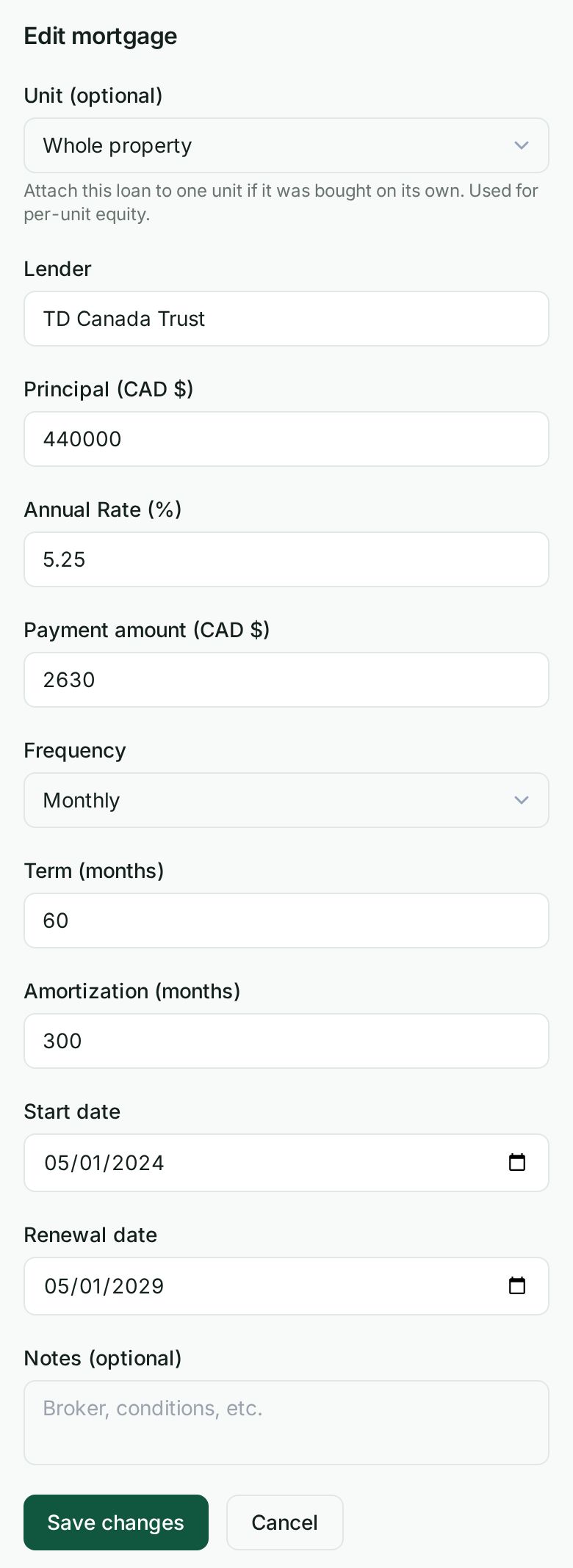
Wealthru works out the balance and the interest from the payment over the whole term, so a new payment changes the balance, the interest and the mortgage interest in your tax package from the start of the term, not just from today. That is still true when you change the payment at a renewal: the new payment is applied from the start of the current term, so the interest for earlier years is restated, including tax years you have already filed. Nothing posts to your books. A new renewal date starts the renewal reminders again for that date.
Say it instead
You can also do this by saying or typing it: press Cmd K, or tap Say or type on a phone. If your account has it turned off, use the steps above.
- Press Cmd K (or Ctrl K), or on a phone tap Say or type at the top of the screen.
- Type or say it. For example, my mortgage renews on March 1 or my mortgage payment is 2140.
- Answer the few questions it asks by tapping: the property, the mortgage, the new renewal date and the new payment. Skip either one to keep it as it is.
- Check the card. It shows what changes, what stays, and that nothing posts to your books. Then choose Yes, record it.
The conversation changes only the payment and the renewal date. A balance or a rate is changed on the Mortgage tab. An amount you say is used as the payment only when you call it the payment, for example my mortgage payment is 2140. If you say a balance, or how much the payment went up, for example my balance is 412000 or my payment went up by 200, Wealthru asks for the new payment instead. If you skip both questions there is nothing to change, and the card says so.
What happens next
- Wealthru works out the current balance and a full payoff schedule from the terms you entered, all exact to the cent.
- The renewal date appears in the property's Key dates with a countdown.
- On Pro and up, you also get renewal reminders at 120, 60, and 30 days out.
If you entered a mortgage when you added the property
If you filled in the price, down payment, rate and amortization when you added the property, your cash flow already uses the mortgage those figures work out to. The Mortgage tab shows it as Mortgage from your purchase details, with the monthly payment, the amount borrowed, the rate and the amortization your figures use.
Choose Record this mortgage to record the loan you actually signed. The form opens with those four figures already filled in. Add your lender, the term and the start and renewal dates, check the payment against your lender's statement, and save. From then on your figures use the loan you recorded, and the Mortgage tab tracks its real balance and renewal.
How the interest is worked out
Canadian fixed-rate mortgages are quoted compounded semi-annually, not in advance, the convention that follows from the federal Interest Act, and Wealthru works every payment, balance and interest figure out that way. At 5.00% that is 2.50% every six months, which is a little less interest each month than dividing 5% by twelve. For example, $500,000 over 25 years at 5.00% is $2,908.02 a month.
- The payment you record is never changed. Only how it splits between interest and principal is worked out on this basis.
- Wealthru does not yet record whether a loan is fixed or variable, so every loan is worked out as fixed-rate. Some variable-rate mortgages compound monthly. If yours does, the interest shown will be slightly lower than your lender's figure, and your lender's annual statement is the figure to use for your taxes.
Notes
- The mortgage record is the authoritative payoff record. It is separate from the purchase details you may have entered under property financials, which are used only until a loan is recorded.
- Net worth, covered in *Property valuation and net worth*, subtracts the current mortgage balance from the property's value to show your equity.
What happens when it renews
Knowing the date is half the question. To see what the payment becomes at a higher rate, see See what your payment becomes at renewal. It is the What if it renews higher? control on this same Mortgage tab.
When the balance is not going down
Some mortgages do not pay down. If your payment covers only the interest, the balance stays the same. If the payment is less than the interest, the shortfall is added on and the balance goes up, so you can end up owing more than you borrowed. Both are real mortgages and both are recorded normally here.
Wealthru shows the balance either way, and the mortgage card says which of the two is happening. That matters for your net worth, because the balance is subtracted from what your properties are worth. If your net worth dropped after a recent update, this is usually why: the balance was previously being reported as paid off, and it is now reported as it stands.
Your interest is still deductible either way, and the T776 pack claims the interest you actually paid over the year.
Was this helpful?