For property managers
Read your dashboard on a computer
Your dashboard is the first page you see. On a computer it uses the whole screen, so more of it fits without scrolling.
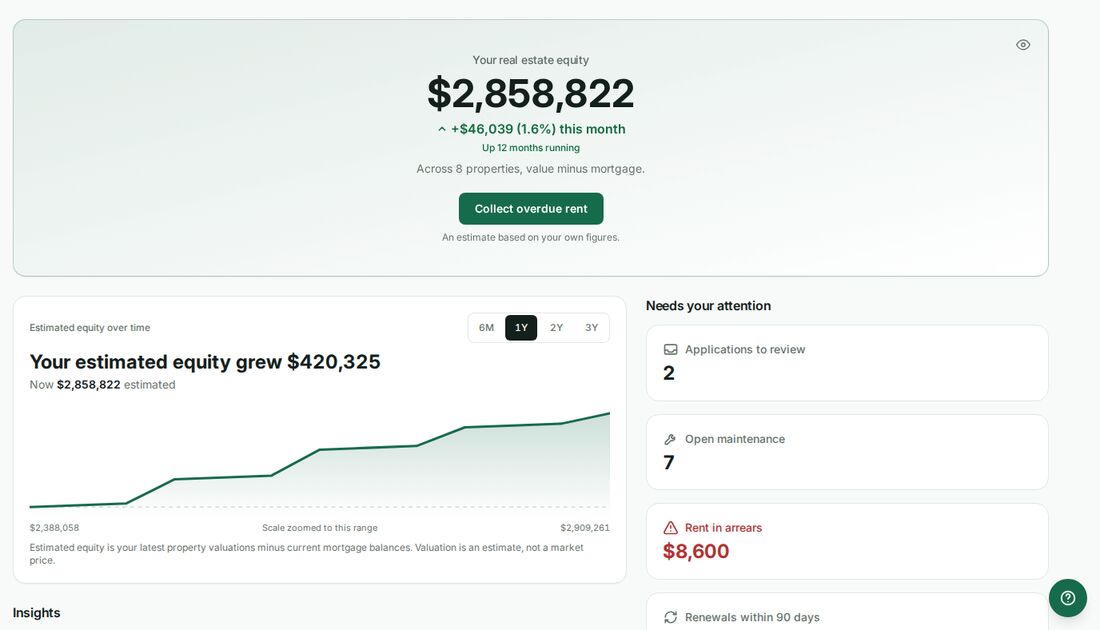
What is where on a computer
On a screen 1280 pixels wide or more, the dashboard has three parts.
- At the top, across the full width: your summary. An owner sees what the portfolio is worth. A property manager sees this month's rent, what is in arrears, open maintenance and renewals.
- On the left: how the portfolio is doing. Your equity over time, your insights, milestones and your monthly recap.
- On the right: what needs you. Needs your attention and Money come first, then your cash flow over the last year, Quick actions such as Record a payment and New lease, the market rent tip, More insights and the assistant.
On a phone, a tablet or a smaller laptop the dashboard is one column, in the same order as before. Nothing moved there.
What a number with a plus sign means
The cards under Needs your attention count everything in your portfolio, however large it is. Very rarely, a list is too long to count in one go. When that happens the card shows the number it did count with a plus sign after it, for example 5,000+. It means at least that many. Open the card to see the full list.
If one of those lists could not be loaded at all, the dashboard says Some to-dos could not be loaded instead of telling you that you are all caught up. Refresh the page to try again.
Was this helpful?