New · Bring your own AI agent
Run your rentals from the AI you already use
Connect Claude, ChatGPT or any AI agent to Wealthru. Ask it to charge rent, log a payment or record an expense. It shows you exactly what will change, and nothing is saved until you approve it in Wealthru.
Charge Nathan December rent for Unit A
Here is what Wealthru will save. Nothing changes until you approve it.
Preview
Add a charge
- Whose lease?
- Nathan Boucher, Unit A
- How much?
- $2,450.00
- When is it due?
- December 1, 2026
- Is it rent, or something else?
- Rent
Money change. You confirm it twice.
Approve in WealthruFrom one sentence to a saved record
Your agent does the typing. You keep the last word on every change.
- 1
Ask in plain words
Type what you want in Claude, ChatGPT or another AI app you already use. "Charge Nathan December rent" is enough.
- 2
See exactly what will change
Your agent shows a preview of the record Wealthru would save, with every field, and a link to approve it.
- 3
Approve it in Wealthru
Open the link. The card waits on Today. Accept it, edit it first, or deny it. Approving never happens in chat.
- 4
Money gets a second look
A change that moves money shows the amount, the date and the record once more. Nothing posts until you say yes.
What happens when you tap Approve
These are real cards from the app, for the same charge. Every field is spelled out, and a money change asks you to check it once more before anything is saved.
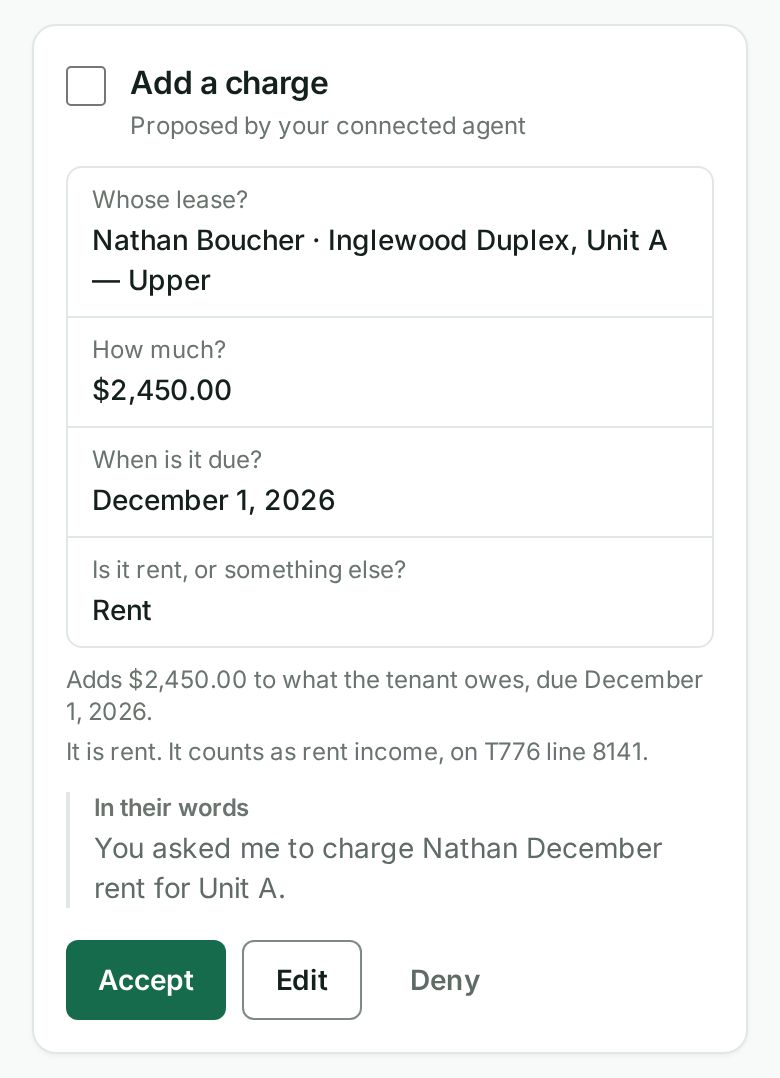
1. The card waits for you. Accept it, edit it first, or deny it with a reason. 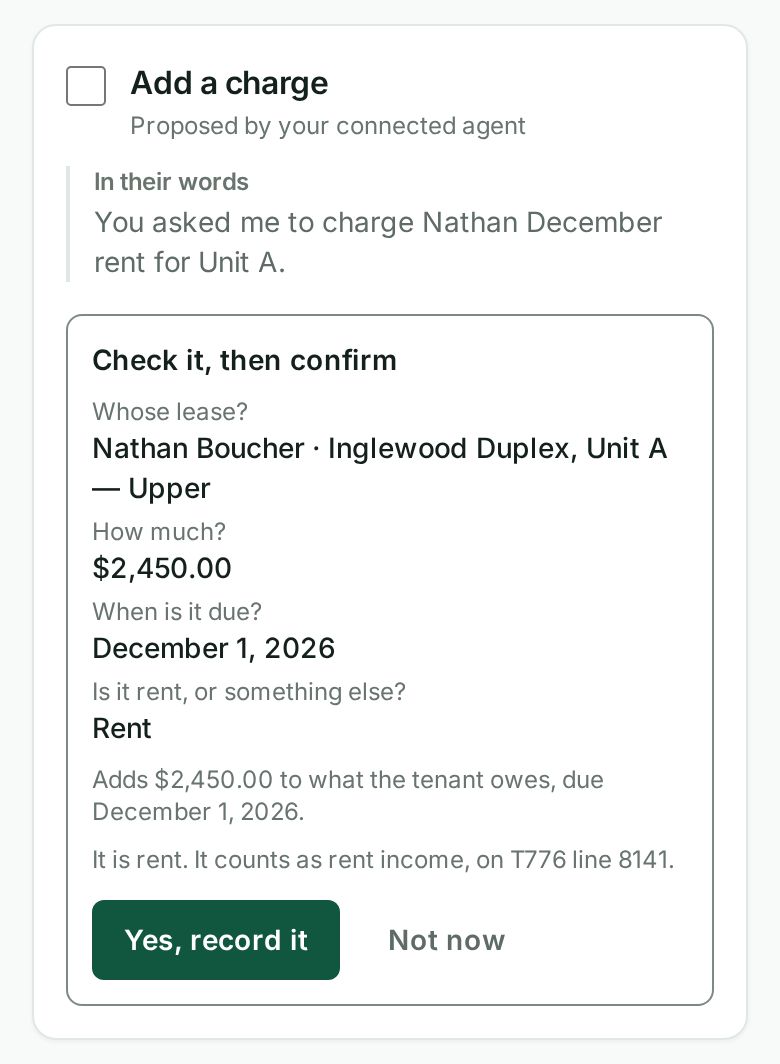
2. Money is confirmed twice. After Accept, you check it once more. Nothing is saved until you tap Yes, record it. 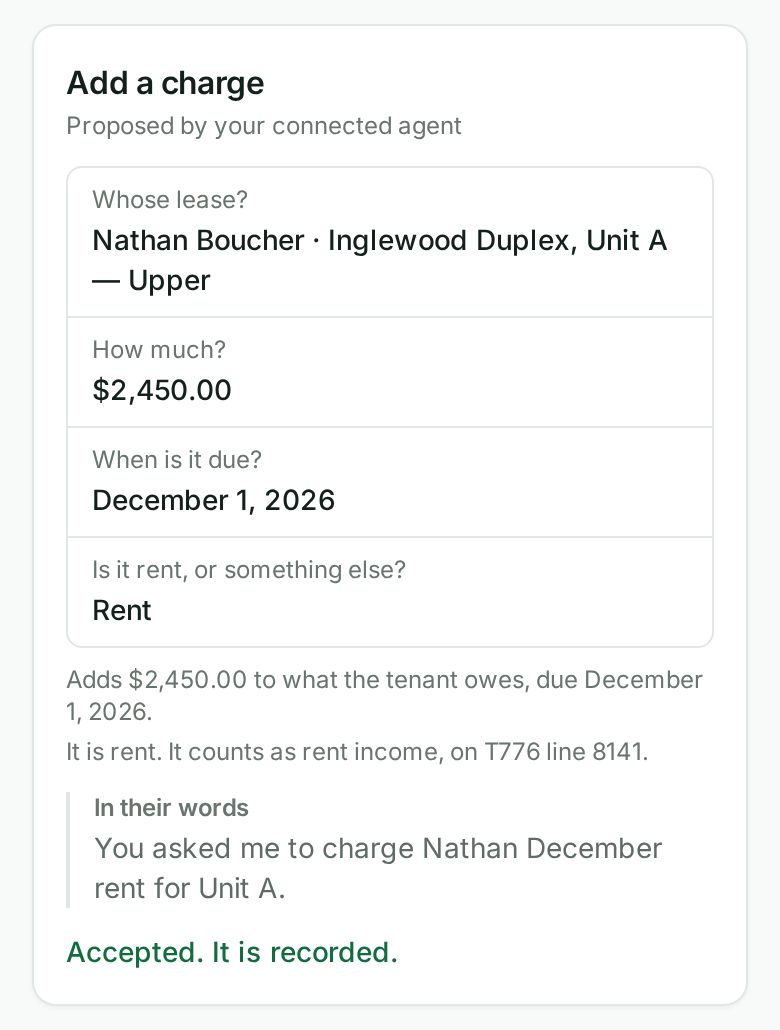
3. It is recorded. The charge is on Nathan’s lease, and your books show it like any other.
You stay in control
An AI agent is helpful and sometimes wrong. So Wealthru never lets one change your books on its own.
- It suggests, you decideAn agent cannot record a payment, send a message or delete anything on its own. Wealthru refuses every change it tries.
- You approve inside WealthruOnly you can approve, and only in the app. A tenant message cannot talk your agent into approving for you.
- It sees what you seeYour agent acts as you, in one account. A property manager's agent sees only their own properties.
- Private details stay privateA tenant's SIN, date of birth, ID documents and screening reports are never shared with an agent.
- Pause or disconnect anytimeSee every connected agent in Settings. Pause one with a tap, or disconnect it for good.
- Same rules as your own clicksAn approved change goes through the same form you would use, with the same checks and the same audit trail.
Just ask
A few of the things you can ask your agent to set up for you. Each one comes back as a card for you to approve. The full list is just below.
Rent and money
- Charge December rent for Unit A
- Log the e-Transfer Nathan sent today
- Add a prorated charge for a mid-month move-in
- Send a friendly rent reminder
- Set up a payment plan for the arrears
- Void the parking charge I added by mistake
Expenses and books
- Record the $340 condo fee
- Make the property tax a monthly recurring cost
- Update the mortgage balance
- Record a new value for the duplex
- Send my accountant the year-end package
Tenants and leases
- Message Nathan about the furnace visit
- Draft a renewal offer for Unit A
- Start a rent increase for next year
- Invite the new tenant to the portal
- Add a key date for the lease end
Maintenance
- Log a leaking tap in Unit B
- Assign the plumber to that request
- Schedule the visit for Tuesday morning
- Mark the dishwasher repair as done
See all 58 things your agent can suggestEvery one comes back as a card for you to approve.
Rent and money
- Log a rent payment
- Add a charge
- Charge prorated rent
- Send a rent reminder
- Set up a payment plan
- Void a charge
- Mark a payment returned
- Move a payment to another month
- Refund a tenant
- Write off a charge
- Recover a write-off
- Record a deposit
- Move a credit into a deposit
- Pay deposit interest
- Settle a deposit
- Email a statement
Expenses and books
- Record an expense
- Resubmit a rejected expense
- Set a recurring cost
- Capitalise an expense
- Record a sold capital asset
- Update a mortgage
- Record a valuation
- Record an insurance policy
- Review approvals
- Close the books
- Email a report
- Send the year-end package to an accountant
Tenants and leases
- Add a tenant
- Invite a tenant to the portal
- Move a lease to its next stage
- Offer a renewal
- Record a renewal answer
- Raise the rent
- Decide a tenant’s notice
- Start a move inspection
- Record a forwarding address
- Add a key date
- Share a document with a tenant
- Open a case file
Maintenance
- New maintenance request
- Update a maintenance request
- Change a request’s priority
- Book a maintenance visit
- Assign a vendor
- Mark a job finished
- Reopen a maintenance request
- Add a vendor
Messages
- Message a tenant
- Send a notice to a property
- Email all your tenantsPortfolio
- Add an internal note
Listings and applications
- Publish or take down a listing
- Send an application
- Decide on an application
Your portfolio and team
- Add a unit
- Invite a team member
- Archive a record
Anything that needs a photo, like scanning a receipt, you do in Wealthru itself.
Or just ask a question
Reading changes nothing, and it works on every plan, including Free.
- Who owes me rent right now?
- What needs me today?
- How much did the duplex cost me in repairs this year?
- Which leases end in the next 90 days?
Suggesting changes is on the Pro and Portfolio plans. What your agent can suggest also follows your role, so a property manager sees only what they could do themselves.
Connect in a minute
Wealthru works with any agent that can add a remote MCP connector. No key and no password to copy.
- 1.In your AI app, add a connector and paste the address.
- 2.Sign in to Wealthru when it opens.
- 3.Read what the agent can and cannot do, then tap Allow.
The address to give your agent
https://api.gowealthru.com/api/mcpWhat your agent reads goes to the company that runs it. Only connect an agent you trust.
Questions
- Which AI agents work with Wealthru?
- Any AI app that can add a remote MCP connector, such as Claude or ChatGPT. MCP is the standard way AI agents connect to other services. You give your agent one address, and it finds the Wealthru sign-in on its own.
- Can my agent change things without asking me?
- No. An agent can only suggest a change. You see exactly what would be saved, then approve it in Wealthru. Money changes ask you to confirm a second time.
- Which plan do I need?
- Every plan, including Free, can connect an agent to read and answer questions. Asking your agent to suggest changes for you to approve is on Pro and Portfolio.
- What does my agent get to see?
- What you can see in that one account, through the same checks the app uses. Some details are never shared, like a tenant's SIN, date of birth, ID documents and screening reports. What your agent reads goes to the company that runs it, so only connect one you trust.
- How do I turn it off?
- In Settings, open Manage connected agents. Pause stops an agent right away. Disconnect removes it for good. Signing out everywhere disconnects every agent too.
Let your agent do the typing
Start free and connect your agent in a minute. Upgrade to Pro when you want it to suggest changes too.
Get started freeClaude is a trademark of Anthropic. ChatGPT is a trademark of OpenAI. Wealthru is not affiliated with either.