For property managers
Work your maintenance and team lists on a big screen
On a laptop or a desktop screen, the Team tables and the Activity feed fit more rows, and the Activity feed uses the width of the screen. On a wide screen, the Maintenance list fits about twice as many requests, with each request's status and its Move to and Re-rank controls on one line. On a smaller laptop it keeps its roomier rows. On a phone they all look exactly as before.
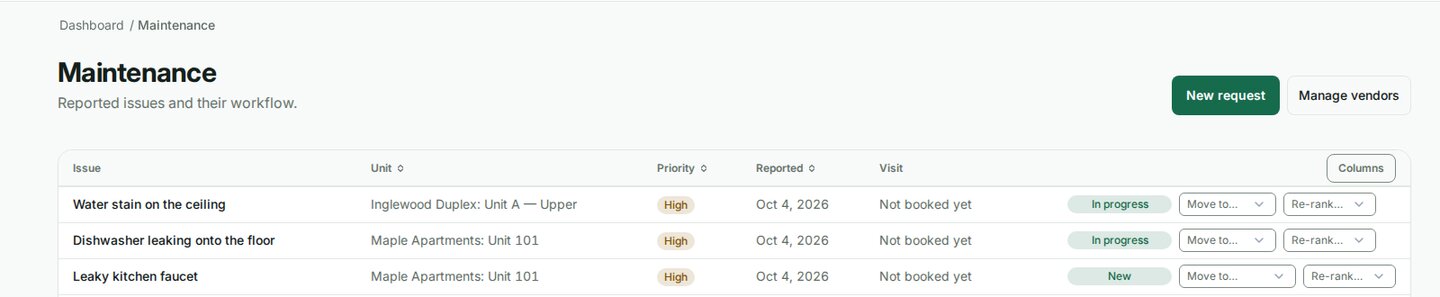
Sort the maintenance list
- Click the Priority heading to see the most urgent requests first. Click again to reverse it.
- Click Reported to see the oldest or the newest requests first, or Unit to group them by property and unit.
- The order is part of the page address, so a reload or a shared link opens the list in the same order. On a phone the list keeps that order, but the headings are not clickable there.
- Every request you can see is listed, however many there are. A very long list says so above it and shows the most urgent requests first, with the newest first within each priority. The headings do not re-sort it.
Sort invitations
On Team, click Email, Status or Expires above your invitations. Sort by Expires to see which pending invites run out first.
The activity feed
The Activity feed and the list of domain events show your most recent activity. When a list is full, the line above it says how many it shows. They are not sortable, because a sort would only reorder the recent part of a longer history.
Hide a column
On a wide screen, the Columns menu at the right end of the Maintenance heading row hides Reported or Visit when you do not need them. The choice is remembered on that browser only.
Related
Was this helpful?