Ask an accountant what makes a set of books trustworthy and you will hear two things. The totals have to balance, and nobody can quietly change a number after the fact. This post walks through how Wealthru gives a self-managing landlord both, without asking you to learn bookkeeping.
What you do without it
Most landlords keep one of two things. A spreadsheet with a row per transaction, or a folder of bank statements that becomes a spreadsheet in the spring. Both record what happened. Neither can tell you whether something is missing, and neither stops a figure being edited months later with no trace of what it was before.
That is fine until your accountant asks why the rent you received does not match the rent you were owed, or until the CRA asks you to support a figure. The CRA's rental income guide expects you to keep records that back up the income and expenses you report.
What Wealthru does instead
You keep working the way you already do. You start a lease, record a payment, enter or scan an expense. Underneath, every one of those events is written to a double-entry general ledger: one side debits an account, the other side credits another, for the same amount. You never post an entry by hand.
A few examples of what that looks like in practice.
- A rent charge records what the tenant owes. Rent receivable goes up and so does rental income.
- A payment records cash arriving. Cash goes up and rent receivable comes down.
- An approved expense goes to the matching expense account, and cash comes down.
- A security deposit is booked as cash you hold and as an amount you owe back, not as income.
The expense accounts line up with the CRA T776 lines, which is why your tax package and your ledger agree.
Step 1. Open the General ledger
Open General ledger under Money.
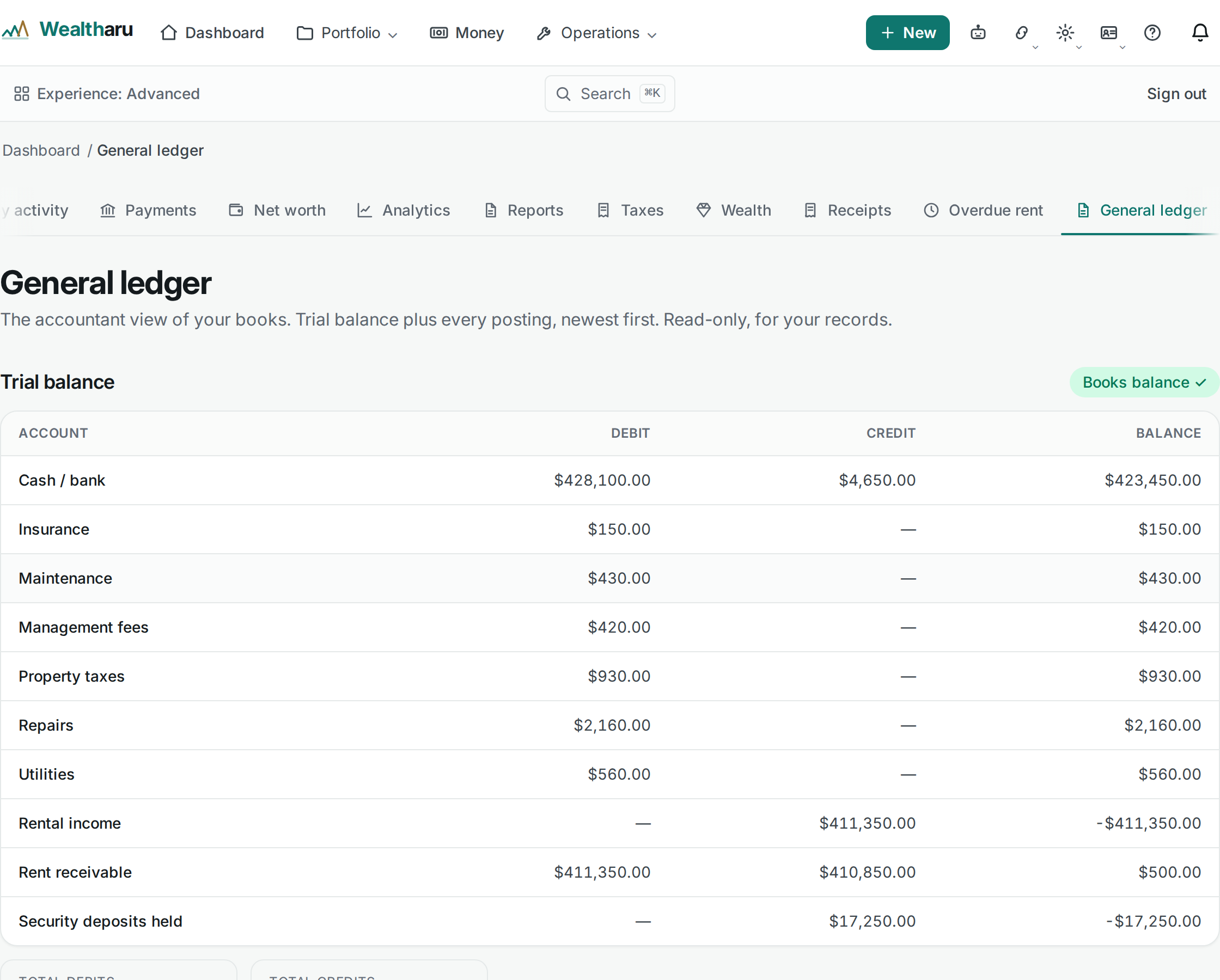
Step 2. Pick a period and read the trial balance
Period chooses what the trial balance covers. All time totals everything, and a year gives you that year's books, with balances as at 31 December. The year view is the one that should agree with your T776 for the same year.
Each row is one account with its debits, its credits and its balance. At the top, the indicator shows Books balance only when two separate checks pass. The first is that debits equal credits. The second is more useful: your charges, payments, refunds, expenses, deposits and property sales are each matched against the ledger, so a record that never reached the books is caught rather than hidden behind a balanced total.
Step 3. Follow one account
Below the trial balance is every posting, newest first, with a Running balance. Choose an Account to follow just Cash or just Rental income. Each amount sits on the date it belongs to, so a December invoice entered in January still lands in December.
Nothing is edited in place
A posted figure is never overwritten. If you change an expense, Wealthru records a reversing entry that cancels the old amount and a new entry for the new one, and both stay in the books. Every money change also records who made it, when, and the before and after values.
The ledger and the change history are each kept as a tamper-evident chain, so a row changed or removed behind the app's back would show.
Handing it to your accountant
Your data export includes the trial balance, the full ledger listing with running balances, the change history and one dated trial balance per year. It is the same set of figures the page shows you, so there is nothing to reconcile between what you saw and what you sent.
This is tooling, not accounting advice. Have your accountant review the figures before you file.
Which plan you need
The general ledger and the trial balance are on every plan, including Free. Posting happens on every account from the first rent charge, whether or not you ever open the page.
Try it
The step by step help article explains each kind of posting and how the transactions list is ordered, and the books feature page covers the rest, including closing a period once a year is done.