Every spring, Canadian landlords meet the same form: Form T776, Statement of Real Estate Rentals. This post walks through how Wealthru prepares it from the records you already keep, so year-end is a review rather than a project.
This is tooling, not tax advice. The CRA's Guide T4036, Rental Income is the authority, and your accountant confirms what you file.
What you do without it
The usual routine starts in February. You export a year of bank transactions, sort each line into rent, repairs, insurance, property tax and so on, and then try to match those categories to the lines on the form. Mortgage payments have to be split by hand into interest, which you can deduct, and principal, which you cannot. A new roof has to be pulled out of repairs because it is a capital cost. If you own a building with a partner, you do the arithmetic for your share.
It is not difficult work. It is just a full weekend, every year, of work your records could have done for you.
What Wealthru does instead
Everything the form asks for is already in Wealthru by the end of the year, because you recorded it while running the rentals. Rent charges come from your leases. Expenses come from what you entered or scanned. The mortgage terms are on each property. The tax package groups all of it to the T776 lines.
Step 1. Keep the year's records complete
The package is only as complete as the data behind it. The rent charged for each month, your operating expenses, and any major improvements you logged are what it reads. If you recorded payments but no rent charges, the page warns you instead of guessing.
Step 2. Open Taxes and pick a year
Open Taxes under Money and choose the tax year.
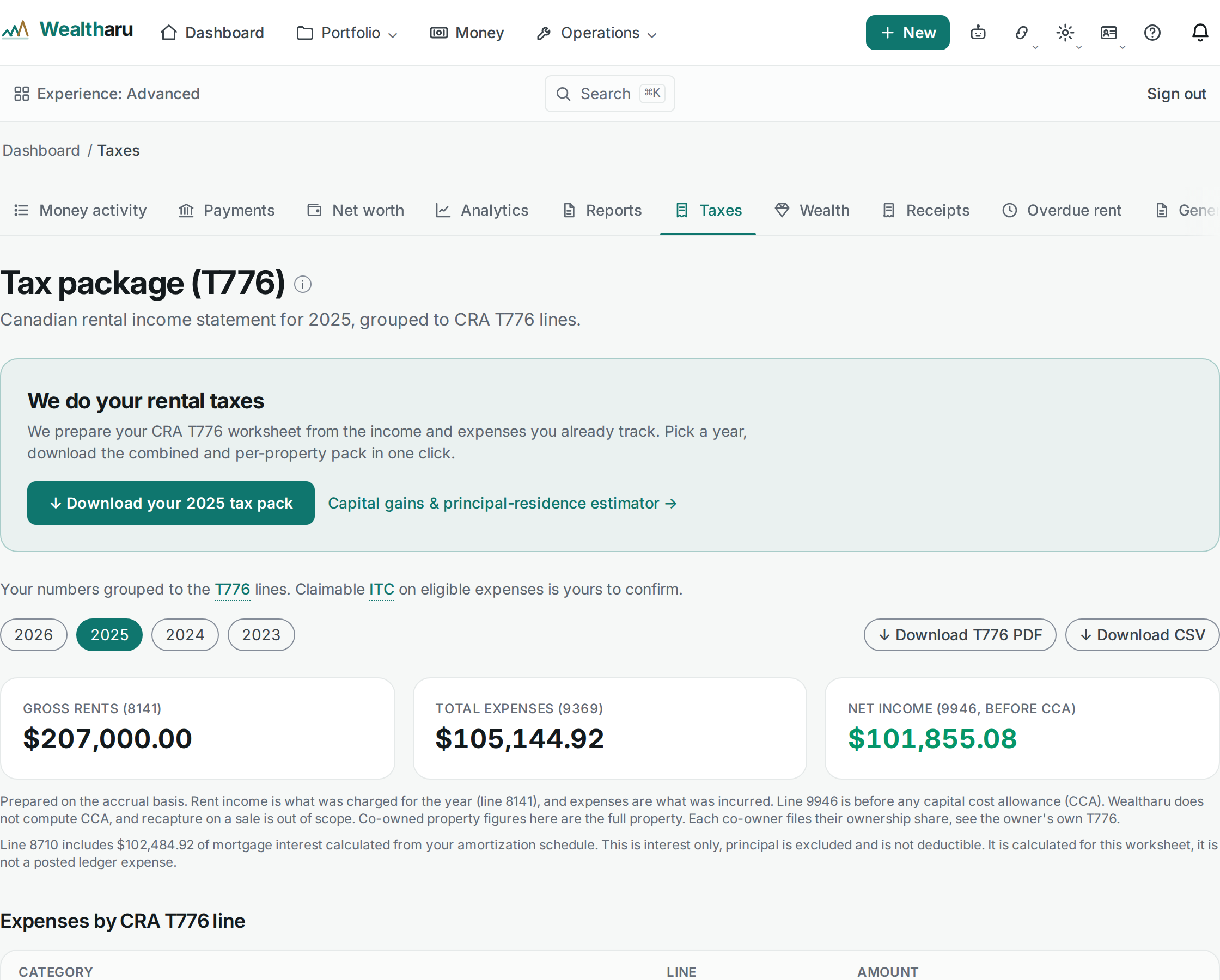
The top of the page shows the three numbers the form builds towards: gross rents (line 8141), total expenses (line 9369) and net income (line 9946). Below them, expenses are grouped by T776 line, with a per-property breakdown.
Step 3. Read the notes under the totals
The page explains its own working, in plain sentences, right under the figures.
- It is prepared on the accrual basis. Gross rents are what was charged for the year, whether or not it was paid yet, and expenses are what was incurred.
- Mortgage interest on line 8710 is worked out from your amortization schedule. Principal is excluded, because it is not deductible, and the page shows how much interest came from the schedule.
- Other income on line 8230 lists what is not rent, such as a fee for a bounced payment or a deposit amount you kept at move-out.
- Anything you marked as a major improvement stays off the operating total and appears on the capital schedule instead.
- Any GST or HST you recorded on expenses is summarized. Long-term residential rent is exempt from GST/HST, so that tax is generally not recoverable as an input tax credit.
Step 4. Download it
Choose Download T776 PDF for a worksheet you can keep or send, or Download CSV if your accountant prefers a spreadsheet. The Download your tax pack button at the top bundles the combined pack and the per-property pack in one go.
Co-owned buildings
If you own a property with someone else, the manager view shows the full property, and says so. An owner's own package is split by the ownership share you recorded, so each person files only their part. The CRA guide explains how co-owners report.
What it deliberately does not do
The package supports your filing. It is not a tax return and it does not file anything for you. Capital cost allowance is optional, so line 9946 is shown before any claim, and how much to claim is a decision for you and your accountant. Every amount is exact to the cent in Canadian dollars.
Which plan you need
The T776 tax package is part of Pro and up.
Try it
The step by step help article covers each line the package fills and what to check before you download. The tax feature page shows the rest, and our earlier article on reading your T776 explains the form itself, line by line.