For property managers
Check whether a message was delivered
Delivery is the third view in Messages. It lists every email, text and push notification sent from your account, and every message that came in, in one timeline. Each sent message shows what happened to it after it left Wealthru: whether the mail server or the phone carrier accepted it, bounced it, or refused it.
Open it
- Go to Messages.
- Tap Delivery at the top.
Each line shows who the message was to (or from), what it was about, the channel, who sent it or whether it was automated, the property, and its status.
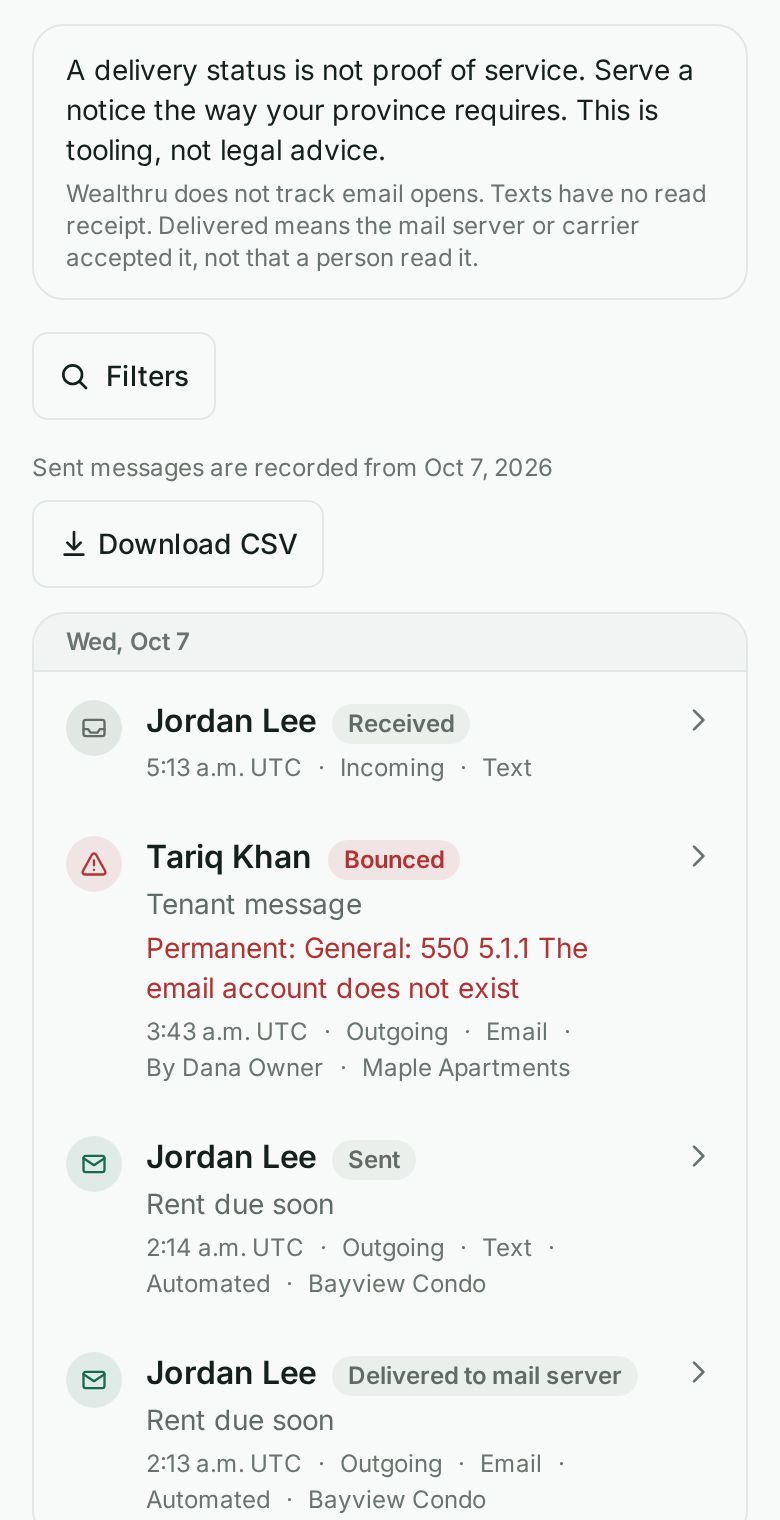
What each status means
- Sent, no report yet: Wealthru handed it to the email or text provider, and nothing has come back yet.
- Delivered: the recipient's mail server or phone carrier accepted it. This is not the same as a person reading it.
- Bounced: the mail server or carrier gave it back. The reason is shown under the name.
- Not sent: the provider refused it, so it never left. The reason is shown under the name.
- Held back: Wealthru did not send it, for example because the person unsubscribed from that kind of message.
- Received: a message someone sent you.
For a push notification, Delivered means the phone's push service accepted it. For an in app message, the status says it was posted in the app.
In a conversation
Each message you send also shows its status under the bubble, with the time:
- One check and Sent: handed to the provider.
- Two checks and Delivered to phone or Delivered to mail server: the carrier or mail server accepted it.
- A warning and Bounced or Not delivered: it did not get through. Open Delivery to see why.
Tap the message (or the status line under it) to see the details: how it was sent (email, text or both), what happened to each, when, and the reason if it did not get through. Tap again to close it.
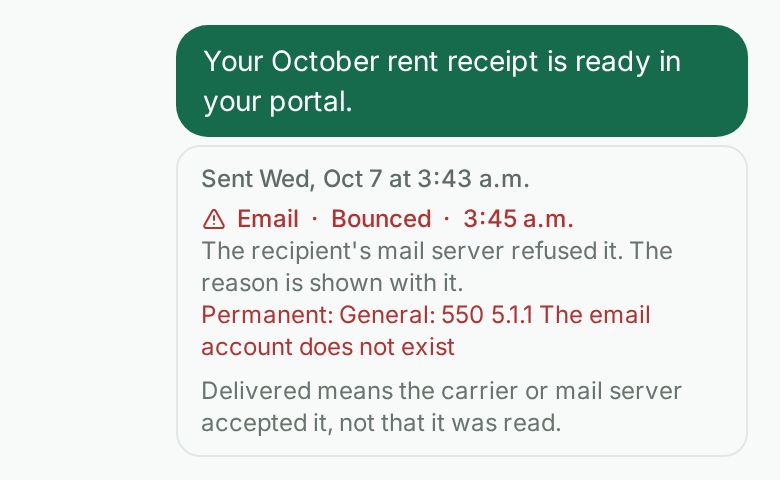
Two checks here never mean the message was read, unlike in some phone messaging apps. If a message shows no status, Wealthru does not know what happened to it.
What Wealthru does not track
Wealthru does not track when an email is opened. Texts are sent as regular SMS, not RCS, and SMS has no read receipt. So no status here can tell you that a person read your message, only that it reached their mail server or carrier.
A delivery status is not proof of service. If you need to serve a notice, serve it the way your province requires. The page says this at the top on purpose. This is tooling, not legal advice.
See the full history of one message
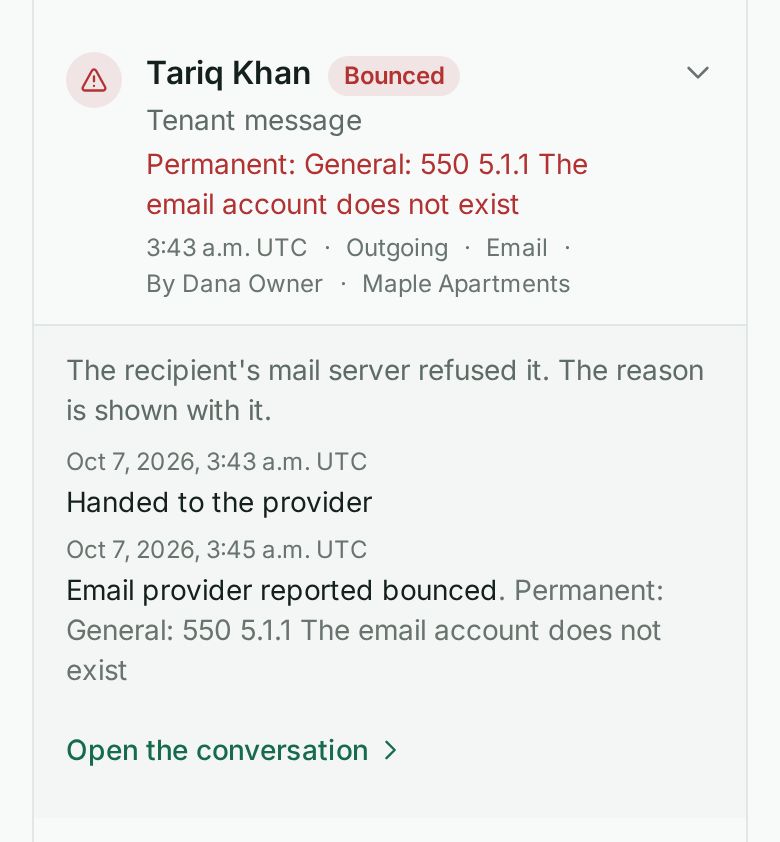
Tap a line to open it. You see each step with its time, for example Handed to the provider, then Email provider reported delivered. If the provider gave a reason for a failure, it is shown too. Tap Open the conversation to read the message itself.
Narrow it down
Tap Filters (on a phone) or use the filter row (on a larger screen). You can combine:
- Direction, Channel and Status, for example every bounced email.
- Purpose, for example only rent reminders.
- Property, Sent by, From and To.
- From date and To date.
Filters go into the web address, so you can bookmark a view. Tap Clear filters to go back to everything.
Download it
Tap Download CSV to export what the filters currently show, up to 5,000 lines. The first line of the file repeats that a delivery status is not proof of service.
Where the history starts
The page shows "Sent messages are recorded from" a date. That is when Wealthru began keeping a delivery record for your account. Messages sent before it are not listed.
If you manage only some properties
If your access is limited to certain properties, you see only the messages about those properties, vendors (who are shared across the account), and what you sent yourself. The page tells you how many other messages there are without showing any of them.
Related
Was this helpful?